The concept of a pouch
Pouch is a term for a digital container which contains all the coins a user holds, like people carrying pouches around their waists when material coins were common.
It is the equivalent of a wallet, or e-wallet in essence.
Each pouch has a specific unique case-sensitive alphanumeric identification number (referred to as pouch id).
When in user view, only transactions and amounts can be looked at.
When in collector view, each coin present in a pouch and every transaction that pouch was involved in can be looked at in detail up to the number of coin bits of each coin that was part of the transaction.
Pouch content
Pouch content which displays a summary of the funds held in a pouch can be displayed in 2 ways:
- Through the POUCH -> CONTENT menu
- By clicking on the POUCH icon from the HOME page
Information provided is as follows:
- Account # is the pouch id
- Alias is a unique easy to remember personalized alphanumeric string that is uniquely identifying a specific account (pouch id)
- Available funds are the sum of all funds that can be used and present in a pouch in the form of coins
- Locked funds are funds that are prevented to be part of a transaction as a result of a user's action
- Locked funds (trade allowed) are funds that are prevented to be part of a transaction but can be part of a trade as a result of a user's action (also referred to as selectively locked funds)
- Unavailable funds are amounts that were transferred into a pouch but are still not in the form of coins. This is a transitional state when funds were received but are not yet part of the Z ecosystem.
Transaction history
Each transaction is recorded and can be displayed in detail. Transaction history is a means to access those.
It can be displayed in 2 ways:
- Through the POUCH -> TRANSACTIONS menu
- By clicking on the POUCH icon from the HOME page, followed by clicking the Transaction history link at the bottom of the pouch content page
Each transaction displayed contains information such as:
- Time: time in YY-MM-DD HH:MM:SS the transaction was recorded (time is displayed based on the local time of the user based on records using GMT time)
- Transaction#: transaction number
- Peer Pouch Id: pouch id of the other party involved in the transaction
- Transaction Type: transaction type
- Inflow: Amount of coins received as part of this transaction in iZ
- Outflow: Amount of coins sent as part of this transaction in iZ
- Balance: Amount of coins held in the pouch after the transaction was recorded
- Reference: Supplemental information to identify the transfer (ex: Account number, invoice number, etc.)
- Note: Text added to the transaction for easy reference/explanation.
Filters can be used to limit the number of results when displaying all the transactions.
Collector view enables transaction numbers to be clickable. When clicked, a page with the details of each coin that were part of the transaction is shown.
Coins (collector view only)
A pouch contains coins.
Coins can be displayed in 2 ways:
- Through the POUCH -> COINS menu
- By clicking on the POUCH VIEW icon from the HOME page
Each coin is displayed with its current status in the pouch as follows:
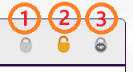
- Locked: coin is locked and cannot be used in a transaction (part of locked funds in pouch content)
- Unlocked: coin is available to be used in a transaction (part of available funds in pouch content)
- Locked (trade allowed): coin cannot be used in a transaction but can be part of a trade (part of locked (trade allowed) funds in pouch content; also referred to as selectively locked)
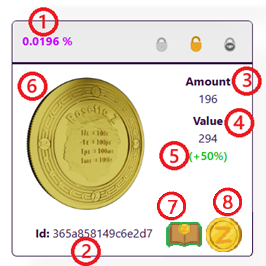
Each coin also features the following information:
- Percentage owned: percentage of the coin being owned
- Id: coin id (serial number)
- Amount: the total amount of units (iZ) of this coin owned
- Value: the current market value of the coin based on any of its coin bits latest transaction amount
- Value variation: the relative value of the market value of the coin versus the nominal value of the coin
- Image: image of the coin (stamped image shown if stamped, otherwise show the Zie-side (Z face) of the coin)
- Collection: icon that defines if the coin is part of a collection or not (if absent) [if present, color code identifies if it is part of a collection that is owned (green) or not (red) by the pouch owner]
- Coin type: icon that easily helps to identify the coin type
Icon helpers are featured in different coin information displays and their meanings are as follows:
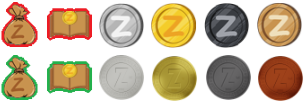
- Pouch ownership: a pouch icon identifies if the coin is owned (green) by the pouch owner or not (red)
- Collection book: a collection book icon identifies the coin is part of a collection that is owned (green), or not (red) by the pouch owner
- Mintable coin / coin type: a coin icon is used as a coin type also defines if it is mintable/printable (realistic coin) or not (cartoonish coin)
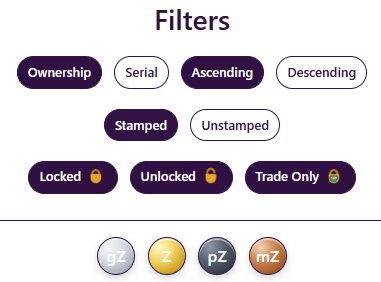
Filters may be applied to display only coins of interest. Filter options are as follows:
- Ownership: coins are ordered based on the amounts owned
- Serial: coins are ordered by alphanumeric id
- Ascending/Descending: determines how ownership and serial filters order coins
- Locked: coins in Locked state are shown when selected
- Unlocked: coins in Unlocked state are shown when selected
- Trade Only: coins in Trade Only state are shown when selected
- Stamped: stamped (coined, with 2 faces) coins are shown when selected
- Unstamped: not stamped yet (uncoined, with only 1 face) coins are shown when selected
- gZ: gZ coins are shown when selected
- Z: Z coins are shown when selected
- pZ: pZ coins are shown when selected
- mZ: mZ coins are shown when selected
Coin profile (collector view only)
Each coin has certain information that is unique and this information is shown as part of the coin profile.
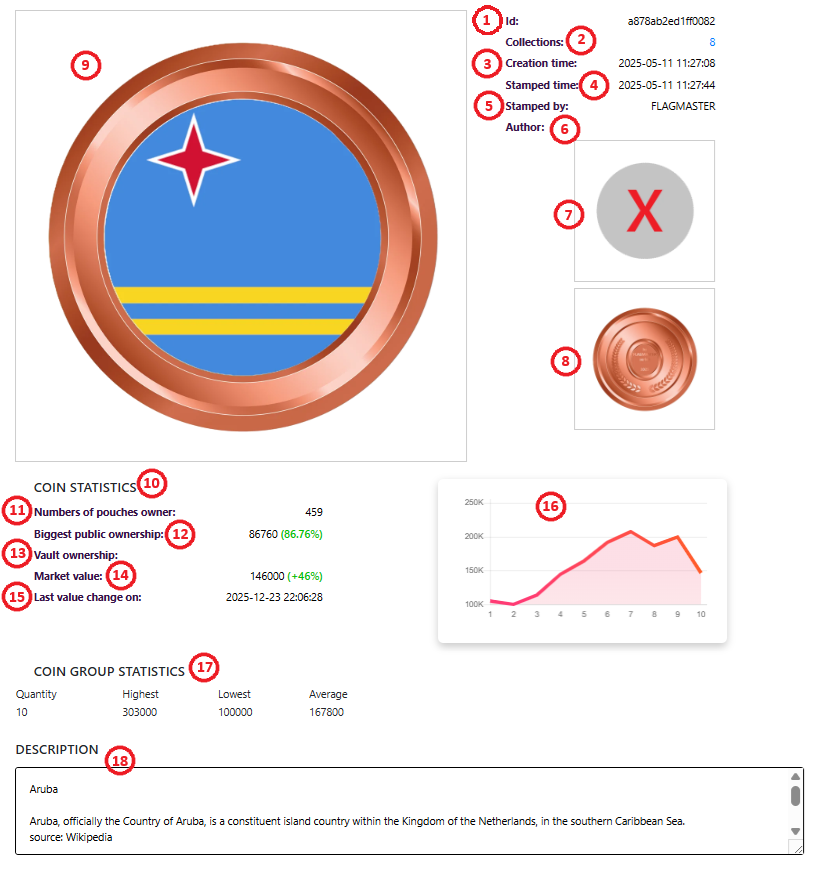
Clicking on the image will display the following information:
- Id: coin id (serial number)
- Collections: which collections (identified by a unique number) the coin belongs to
- Creation time: time when the coin got created
- Stamped time: time when the coin got stamped (customized image)
- Stamped by: user (pouch id) that stamped this coin
- Author: artist that created the stamped image or that the image is credited to
- Image of the rotating stamped coin if printable
- Still image of the zie face side
- Still image of the stamped side
- Statistics section
- Number of pouch owners: number of pouches where parts of this coin are present
- Biggest public ownership: number of units and percentage of that coin owned by the user that owns the most of this coin
- Vault ownership: number of units and percentage of that coin owned by the Vault
- Market value: value of the coin based on the latest transaction
- Last value change on: time the latest transaction that impacted the value of the coin occurred
- Graph showing the last 10 modifications in price of the coin to show the trend of this coin value
- Coin group statistics section showing the quantity of identically stamped coins and the market values associated to them by identifying the highest, lowest and average values of those coins
- Description: description of the coin provided when stamped
Collections (collector view only)
Each collection is formed of one to a maximum of 1000 coins. A coin can be present in more than one collection. Ownership of any amount of coin bits of a coin is enough for the coin that matches the collection criteria to show up.
It can be displayed in 3 ways:
- Through the POUCH -> COLLECTIONS menu and then choosing which collection to look at by clicking on VIEW
- By clicking on the COLLECTION BOOK icon from the HOME page, followed by clicking on the desired collection to look at by clicking on VIEW
- By clicking on a collection number displayed in the coin profile
Description of the collection as well as coins are displayed. Coins that are not owned are only showing the required criteria. The criteria to determine which coin should qualify to meet the requirements to show up are as follows:
- Id: coin id (serial number)
- Image and coin type: Both the image and the coin type must match for the coin to show up
As soon as the criteria are met, the temporary coin image will be replaced by the owned coin. Operations on the coins such as locking or unlocking are allowed at this stage to enable protection or unlocking of the coin by the coin owner. Statistics for the collection ownership will also be updated. The look of the coins when not owned show up as designed by the creator of the collection. A collection has an open status if the collection is deemed not done by the creator of the collection and new coins can be added or removed to it. A collection has a closed status when no more changes can be done by the creator of the collection and the collection is considered locked from changes. Text that warns a user that a collection can be updated shows up for collections that are in open status only.



 Home
Home